Free Monthly Budget Planner Exel Template
You look at your bank balance three weeks into the month and think, “Wait, where did it all actually go?”
Most of us don’t overspend on big luxury items; money slips away through subtle everyday leaks—midweek takeout, forgotten subscriptions, and irregular utility bills. While fancy personal finance apps promise clarity, they often hide your data behind paywalls, clunky sync errors, and complicated dashboards that take an afternoon to learn.
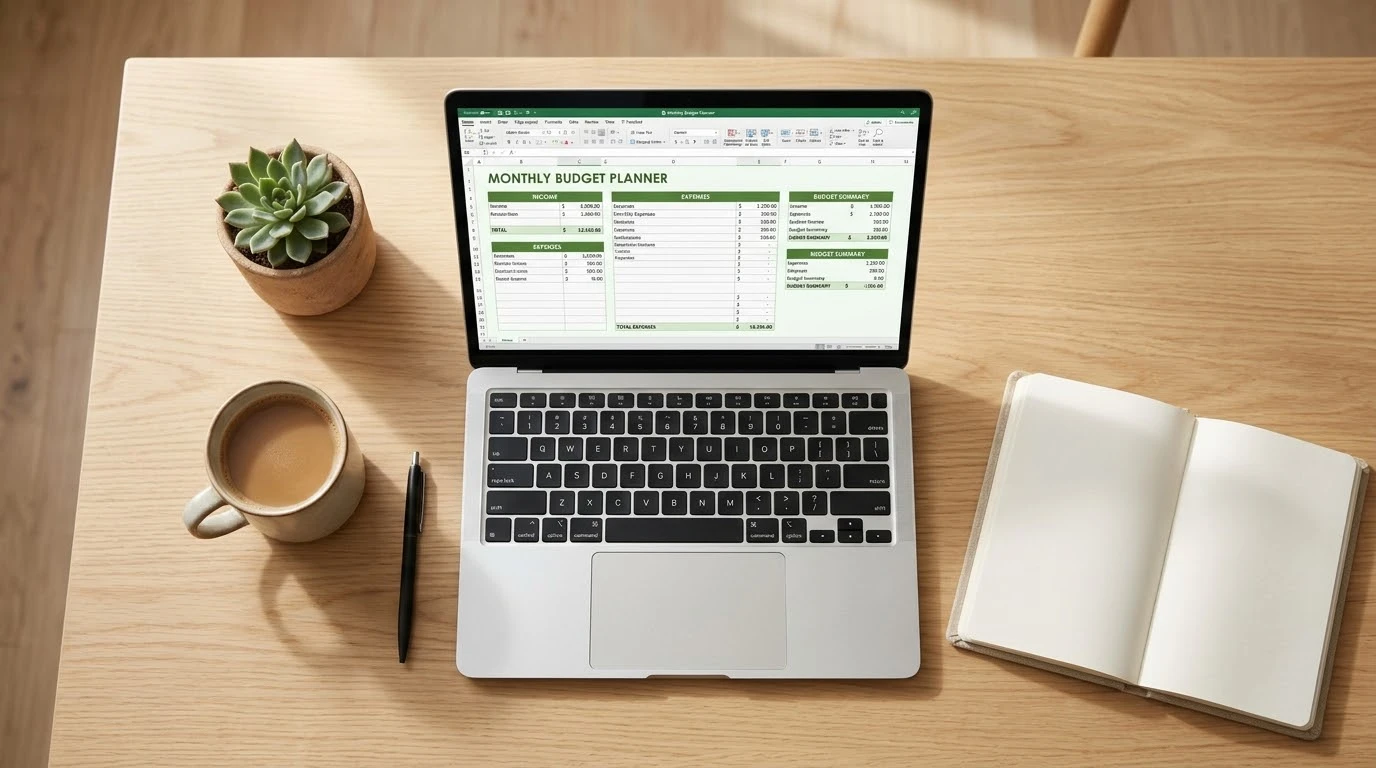
If you want complete control of your finances without the headaches, our Monthly Budget Planner Excel spreadsheet is built for you. Clean, lightweight, and fully automated, it delivers total clarity in seconds.
:::download-box
📥 Download Your Free Monthly Budget Planner
Take charge of your money today. Get your pre-formulated, ready-to-use Excel template instantly—no sign-ups or subscriptions required.
👉 Download Free Excel Template (.xlsx)
:::
What Makes This Budget Planner Practical & Effective?
Unlike bulky financial spreadsheets packed with confusing macros, this planner focuses strictly on what drives real financial habits:
- Instant Cash Flow Summary: At the top of your dashboard, three key metrics update automatically as you type: Total Income, Total Expenses, and your net Money Left. You always know your exact bottom line at a single glance.
- Multi-Source Income Tracking: Modern finances aren’t always one paycheck. Easily log day-job salaries, side-gig revenue, investment returns, and freelance payouts in one unified ledger.
- Pre-Categorized Everyday Expenses: Designed around real living costs—housing, utilities, groceries, transport, health, entertainment, loan payoffs, and emergency savings—with customizable rows for unique monthly bills.
- Integrated Goals & Notes Section: Track personal debt-reduction targets, emergency fund milestones, or log irregular annual expenses without cluttering your formula cells.
- 100% Private and Offline: No bank logins, third-party data tracking, or syncing glitches. Your financial records live securely on your computer.
How to Use It for the Best Results
Getting the most out of your budget doesn’t require hours of bookkeeping. Follow this quick routine:
- Set Up the Month: Open your template and enter the current month at the top of the sheet.
- Log Your Anticipated Income: Enter your expected take-home pay, side-hustle revenue, and any secondary cash flow in the Income column.
- Map Fixed & Variable Expenses: Fill in your mandatory bills (rent/mortgage, phone, insurance), followed by realistic estimates for variable categories like food and entertainment.
- Check Your “Money Left”: Review the summary box. Aim for a positive balance, directing any excess funds toward your Debt / Loans or Savings rows.
- Update Weekly: Spend 5 minutes every Sunday afternoon reconciling your actual spending against your sheet to stay on track all month long.
Who Is This For?
- Busy Professionals: Anyone who wants a fast, accurate financial snapshot without logging into multiple bank interfaces.
- Freelancers & Side Hustlers: Creators and contractors balancing irregular client checks and seasonal cash flows.
- Couples & Households: Partners seeking an open, easy-to-read template to split bills and track joint savings targets.
- Beginner Budgeters: First-time planners who want a structured, error-proof sheet with pre-built math.
Frequently Asked Questions (FAQ)
Can I use this template in Google Sheets?
Yes. Simply open Google Drive, click New > File upload, and select the .xlsx file. Choose Open with Google Sheets, and every formula and layout style will function natively.
Do I need advanced Excel skills to use this sheet?
Not at all. Every calculation—including total income, category sums, and remaining cash balances—is pre-configured. All you need to do is enter your numbers into the designated cells.
Can I customize or add more expense categories?
Yes. You can rename existing labels or insert additional rows directly into the expense ledger without breaking the automated total sums.
Take Control of Your Money Today
Financial peace of mind doesn’t come from earning an endless salary—it comes from knowing where every single dollar goes. With a structured monthly plan, you can eliminate money anxiety, pay down lingering debts, and grow your savings on autopilot.
👉 Click Here to Download the Monthly Budget Planner Excel Template